Showing posts with label photo editing. Show all posts

Aviary launches free mobile app photo editor for iOS & Android


Aviary Photo Editor

Aviary is a great resource that I use constantly. I use the Falcon and Talon online image editors to grab images from the web and edit/crop/add effects to use with my blog and with lesson materials. There are browser extensions to use with the online apps and it's very powerful.

A while back, Aviary launched an add-on for mobile devices that allowed you to use Aviary within mobile apps. Yesterday they announced that Aviary is now available as a free, stand-alone mobile app for iOS and Android.


The Aviary mobile app is free and features an easy-to-use, intuitive interface with effects, stickers, color balance, crop and rotate, brightness, contrast, saturation, drawing, text, cosmetic tools and more. There are more effects available for purchase in effects packages ($0.99) and more effects and tools are being added. 

This is a great mobile tool that can be used for photo editing and effects on iOS and Android devices by teachers, students, bloggers, and for personal use, greatly increasing the abilities of your device. I now have the ability to do more of my work on my mobile device using this app. I was using it last night to edit some photos that I'm using in a project and it was very easy to use. 


 Try it out for yourself:


Related:

Aviary Falcon - online image markup

Aviary Education - safe environment for Aviary for Students
Aviary for Facebook Released - image editing app right in Facebook
Aviary Photo Editor now available to Flickr users-replacing Picnik
PicMonkey - free online photo editing (from some of the same people who made Picnik)

Great, free Image editing sites and software

Two More Free Image Editing Resources


  • Digg
  • Del.icio.us
  • StumbleUpon
  • Reddit
  • RSS

Cloudinary - host and edit images online for free


cloudinary logo - transparent (500px)

Cloudinary is a site that provides image hosting and editing/formatting. The free version has great features and is all most people would need.

Cloudinary lets you use a custom URL to format and edit your images online. You upload your image and then access them using the special URL based on the formatting you want. The original photo stays online and you can request different formats based on your needs. You can even automatically combine multiple images into one.


This makes it very easy to manipulate and use images in your websites or blogs.

The free version has 95% of the features the paid versions do. The main difference is limits. The free version limits you to 500MB of storage, 50,000 images, and 1,000 MB of monthly bandwith. That's a lot for most users.

Check it out and see how it will work for you. http://cloudinary.com


Related:

Great, free Image editing sites and software

Two More Free Image Editing Resources


  • Digg
  • Del.icio.us
  • StumbleUpon
  • Reddit
  • RSS

Pinta - free image editing and drawing software


Pinta is a free image editing and drawing app for Windows, Linux and Mac. It's modeled after Paint.NET and is very easy and simple to use. It has some great features and functions.

It features drawing tools, unlimited layers, multiple languages, adjustments and effects and more.


It's a great drawing and graphics editing software.

Check it out: http://pinta-project.com/


Related:

Great, free Image editing sites and software

Two Free Graphic creation and editing software

PicMonkey - free online photo editing

Two More Free Image Editing Resources


  • Digg
  • Del.icio.us
  • StumbleUpon
  • Reddit
  • RSS

Kodak Gallery shutting down July 2nd - Shutterfly buying it


I wrote about Kodak Gallery back in February (online photo service that allows you to upload, share, and view your photos from anywhere) and then updated in March that it was up for sale and now it is official that Kodak Gallery is being shut down and be bought by Shutterfly. Kodak Gallery had just announced their mobile apps too.

Shutterfly is an online photo service and social sharing network that allows unlimited images at no cost and at full resolution. Photo Books are their flagship product, which allows people to create photo books with covers, templates and designs.

Kodak Gallery is scheduled to shut down July 2nd and Shutterfly will be buying the business.


On a side note, Kodak Gallery is accessible from school, Shutterfly is blocked as a "shopping site." Thank goodness for 3G on my Chromebook so I could check out Shutterfly.


Here are some more online photo gallery and photo editing services.

PicMonkey - free online photo editing

Great, free Image editing sites and software

Two More Free Image Editing Resources

Smilebox Slideshow - free software to create slideshows of your photos


  • Digg
  • Del.icio.us
  • StumbleUpon
  • Reddit
  • RSS

Adobe Photoshop Touch Review - very nice app


Adobe Touch Apps family

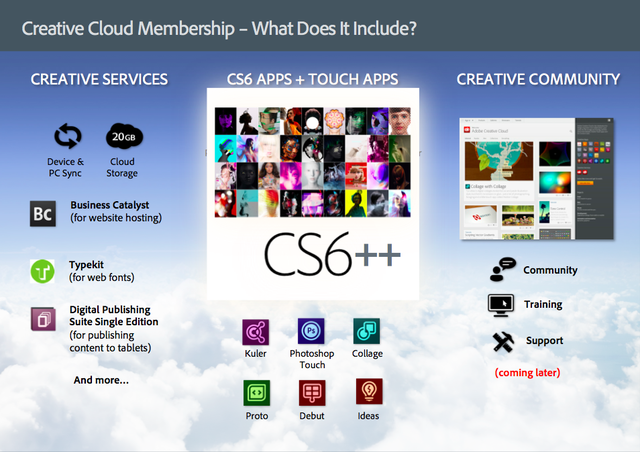
Adobe recently released a host of Adobe TouchApps - Photoshop Touch, Ideas, Collage, Debut, Kuler, Proto, and Carousel. Design, edit, and elegantly present your work using six new Adobe® Touch Apps designed for your tablet. Whether you use a stylus or just your fingertip, intuitive touchscreen features provide easy, precise control for a variety of creative tasks. Transfer files through Adobe Creative Cloud for refinement in Adobe Creative Suite® software — or to view, access, and share from almost anywhere.

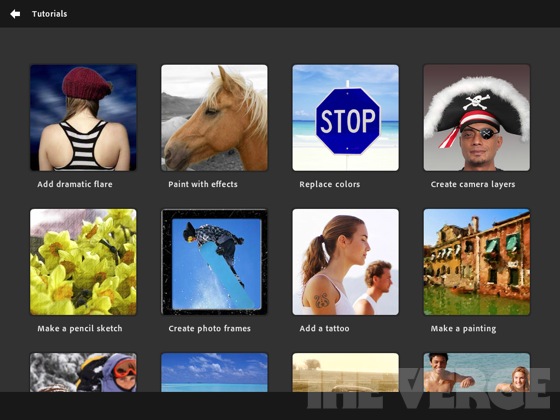
I have been using Adobe Photoshop Touch for the last couple of weeks on a loaned iPad and a friend has it on his Android tablet. The Photoshop Touch app lets you quickly combine images, apply professional effects, share the results with friends and family through social networking sites like Facebook, and more. If you have used Photoshop, the Touch app will be a breeze for you. If you haven't used Photoshop, don't worry, the Touch app is easy to use, has interactive tutorials, and there are tons of help resources on Adobe's site and for educators on the Adobe Education Exchange, which is a resource site for educators who use Adobe products. Tips, instruction guides, videos, a community of users, lesson examples and much more are all available to help teachers and students using Adobe products.


Adobe's new Creative Cloud/Suite 6 for Students and Educators integrates the Photoshop Touch app so that you can work on your projects seamlessly from mobile to desktop. 


The Photoshop Touch app was very easy to learn and get started with. I did use some of the tutorials, and had read a few posts on the education exchange site, but it was very intuitive. Features include layers, effects, filters, tone and edge editing, text, search for images, share images, wireless printing, and much more. The tools are all, literally at your fingertips on the app. Because it's not the full version of Photoshop, it's easier to find the tools that you use the most. It is probably the best image editing app for tablets around and still has all the really important and useful features from the full version of Photoshop. It's easy to bring in an image, edit and manipulate it, and the save it. It's only $9.99, which is super cheap for Photoshop and the Education Volume app store has it for $4.99, which makes it very affordable for education.
Adobe-photoshop-touch-ipad-review-7

I had some fun playing with different pictures I took with the iPad, although the quality of them wasn't great using the iPad's camera, so I also brought in some other pictures and graphics files to play with. It was very easy to clean up images and there is even a gallery of styles and effects that you can look at and then see a step-by-step tutorial on how to achieve those effects.

This is a great app for education. It's inexpensive, easy to use, full featured, and a tool that students should learn to use as it will help them in college and careers.

Here are some screenshots from Adobe's site:
pstouch-1-295x221
pstouch-2-295x221

pstouch-3-295x221

pstouch-5-295x221


Adobe Announces Creative Cloud/Suite 6 for Students and Educators
Link to Photoshop Touch page on Adobe's site: http://www.adobe.com/products/photoshop-touch.html

Original Announcement of app: Adobe PhotoShop Touch for iPad2 now available
Photoshop Touch for iOS. $9.99 


Photoshop Touch for Android. $9.99 


DISCLAIMER: I received a free copy of the Adobe Photoshop Touch app to do this review. I have been using it, and the Adobe Education Exchange, as part of this review.


  • Digg
  • Del.icio.us
  • StumbleUpon
  • Reddit
  • RSS

Aviary Photo Editor now available to Flickr users-replacing Picnik


Picnik, Flickr's default photo editor, is shutting down this month. Aviary has come to the rescue though, launching an HTML5 based online photo editor into Flickr.

Aviary is a great resource, having online photo and graphics editors, audio editors, web page screen shot extensions and more.

Aviary's photo editor is in the "Actions" menu on Flickr and is easy to use. It is being rolled out over the next few weeks. It's fast, easy to use, powerful, and available on mobile and iOS devices since it is HTML5 based, not Flash.

If you use Flickr, this will be a great resource for you.

See the Related links below for other free image and photo editing services.


Source: TechCrunch http://techcrunch.com

Related:

PicMonkey - free online photo editing (from some of the same people who made Picnik)


  • Digg
  • Del.icio.us
  • StumbleUpon
  • Reddit
  • RSS

PicMonkey - free online photo editing


PicMonkey is a service I learned about from Dave Kapuler that is an easy to use, free, online photo editing service.

PicMonkey is very easy to use. Simply upload or drag and drop a photo onto the site and edit away.

It was created by some former Picnik engineers and is a great resource, touting itself as faster and more powerful than Picnik. And, Picnik is shutting down, so this is a great replacement.

You can crop, rotate, add effects, add borders and text, and manipulate photos with some very powerful and useful editing tools, all online.


Related:

Great, free Image editing sites and software

Two More Free Image Editing Resources


  • Digg
  • Del.icio.us
  • StumbleUpon
  • Reddit
  • RSS

Adobe announces Adobe Photoshop CS6 beta free download


Adobe Photoshop CS6 Beta 


Today, Adobe announced Adobe Photoshop CS6 beta, a preview of the highly anticipated upcoming version of the industry-leading digital imaging tool. Please help us spread the news by posting about the availability & encouraging downloads. Additionally, we'd love for you to play around with it & share your thoughts on these new features & enhancements.

The beta includes several new features and enhancements that will be shipped as part of the final release slated for the first half of 2012, including:

· An updated, darker UI that makes images pop
· Increased performance, powered by the new Adobe Mercury Graphics Engine, that accelerates results from popular editing tools including Liquify, Puppet Warp, Transform and Lighting Effects
· Content-Aware Patch, which allows greater control by letting users select and duplicate an area of an image to fill in or “patch” another
· Content-Aware Move, which lets users select and magically move an object to a new place in the image

Over the past couple of months, Adobe's been giving out occasional sneaks of new features coming in Adobe Photoshop CS6 and they've made them available in one convenient place: http://blogs.adobe.com/creativelayer/2012/03/16/photoshop-sneak-peeks/#more

“As an educator, enhancements in Adobe Photoshop CS6 including the Mercury Graphics Engine and new Crop Tool make it possible to save valuable classroom time editing so that we can quickly move on to the next project,” said DanArmstrong, graphic arts teacher, Lake City High School. “With Adobe Photoshop CS6, we have moved from usability to enjoyability and I love it!”

Photoshop CS6 Beta is available immediately as a free download on Adobe Labs for Mac OS and Windows – in English and Japanese. At installation, users will be required to provide an Adobe ID to complete a one-time login and online product activation. Beta users can submit feedback via the Photoshop CS6 beta forum.

The Adobe Press Release can be found here: http://www.adobe.com/aboutadobe/pressroom/pressreleases/201203/032212AdobePhotoshopCS6Beta.html


  • Digg
  • Del.icio.us
  • StumbleUpon
  • Reddit
  • RSS

Shutterfly looking to buy Kodak Gallery


I just wrote about Kodak Gallery (online photo service that allows you to upload, share, and view your photos from anywhere) and now it looks like they are going to be bought out by Shutterfly. Kodak Gallery had just announced their mobile apps too.

Shutterfly is an online photo service and social sharing network that allows unlimited images at no cost and at full resolution. Photo Books are their flagship product, which allows people to create photo books with covers, templates and designs.

The sale is not final, so we'll see what happens.


On a side note, Kodak Gallery is accessible from school, Shutterfly is blocked as a "shopping site." Thank goodness for 3G on my Chromebook so I could check out Shutterfly.


  • Digg
  • Del.icio.us
  • StumbleUpon
  • Reddit
  • RSS

Two Free Graphic creation and editing software


There are two free programs that I think are great for editing and creating graphics.


The first is paint.net. This software was originally created as a school project and is now continually being modified and improved. It is a great tool for editing photos and graphics. I found it to be very polished and powerful. There are tutorials, a user forum, and a great help section available also. I use this for editing graphics for school projects and for this blog. 


Tuxpaint is a great drawing program, especially for the lower grades. It is easy to use and has a lot of built in functions.

I use paint.net to edit photos and graphics that I then use in my classroom. I've used Tux Paint to create some simple graphics for my lessons.


  • Digg
  • Del.icio.us
  • StumbleUpon
  • Reddit
  • RSS