Showing posts with label apps for education. Show all posts

List of some Free Online Scientific/Graphing Calculators


Calculators are a necessary tool in science and math classes. But, they don't have to cost the students anything.

First, there are a ton of free calculator apps available for every smartphone (iOS, webOS, Android, BB, Windows) so any student with a smartphone or PDA can get one on there. The paid apps are usually only $0.99 - $1.99 too.

Second, there are some free downloadable calculators, such as Microsoft Math and most computers have a built in calculator.

But, free, online calculators are also a great resource for educators and students. There are calculator extensions for Chrome and Firefox that students can use on their computer or through their Google account.

Here are some free online calculators that I like:


Richard Byrne over at Free Technology for Teachers also recommends EnCalc as a great, free, online scientific calculator. 


Desmos

A Better Calculator is a new, free, online graphing calculator from Demos (who also offers a service to create online interactive media). There is nothing to download as it runs online. It is easy to use, full color, full functioned. You can share your work online or even share it with others (like your students) or students can share it with their teacher.


Google is now a graphing calculator. Enter the equation in the search bar and you get your graph. You can even do multiple functions, just separate them by a comma. You can also zoom and pan in the graphs. You can also do other calculator functions using the search bar. 


Calculator

To use Google’s built-in calculator function, simply enter the calculation you’d like done into the search box.
Example:  


Here's a screen shot of a quick one I did: y = 4x + 5


According to Google, "This feature covers an extensive range of single variable functions including trigonometric, exponential, logarithmic and their compositions, and is available in modern browsers."


Web 2.0 Calc.com - free online scientific calculator. Available on mobile browser. Can be embedded in your own website or blog too.


Math.com's online calculators - basic, scientific, square root, and more.


eCalc online calculator and math help - has an online calculator along with math help. There are also downloadable calculators, an iPhone app, iGoogle gadget, and embeddable widget for your site. There is also an unit conversion calculator.


Scientific Calculator - online scientific calculator that takes up whole web page. Makes it easier to read and use.


Save money and use free calculators instead of buying them!


Related:

Desmos - create media rich educational content online


  • Digg
  • Del.icio.us
  • StumbleUpon
  • Reddit
  • RSS

Aviary launches free mobile app photo editor for iOS & Android


Aviary Photo Editor

Aviary is a great resource that I use constantly. I use the Falcon and Talon online image editors to grab images from the web and edit/crop/add effects to use with my blog and with lesson materials. There are browser extensions to use with the online apps and it's very powerful.

A while back, Aviary launched an add-on for mobile devices that allowed you to use Aviary within mobile apps. Yesterday they announced that Aviary is now available as a free, stand-alone mobile app for iOS and Android.


The Aviary mobile app is free and features an easy-to-use, intuitive interface with effects, stickers, color balance, crop and rotate, brightness, contrast, saturation, drawing, text, cosmetic tools and more. There are more effects available for purchase in effects packages ($0.99) and more effects and tools are being added. 

This is a great mobile tool that can be used for photo editing and effects on iOS and Android devices by teachers, students, bloggers, and for personal use, greatly increasing the abilities of your device. I now have the ability to do more of my work on my mobile device using this app. I was using it last night to edit some photos that I'm using in a project and it was very easy to use. 


 Try it out for yourself:


Related:

Aviary Falcon - online image markup

Aviary Education - safe environment for Aviary for Students
Aviary for Facebook Released - image editing app right in Facebook
Aviary Photo Editor now available to Flickr users-replacing Picnik
PicMonkey - free online photo editing (from some of the same people who made Picnik)

Great, free Image editing sites and software

Two More Free Image Editing Resources


  • Digg
  • Del.icio.us
  • StumbleUpon
  • Reddit
  • RSS

Assignment Planner - free Android app for Students

Assignment Planner FREE


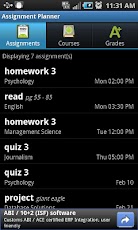
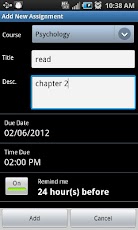
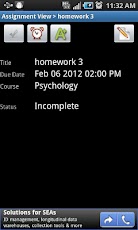
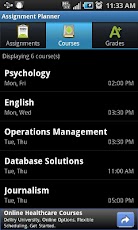
I just learned about Assignment Planner from Edudemic. Assignment Planner is a free app for Android that keeps track of assignments, homework, projects, course and class information, and grades. It includes the ability to sort assignments by due date or course and set reminders for assignments. It's easy to use and got excellent reviews. (Here are some more apps for students for notes and class planning)

The free version has ads (at bottom of the screen - never bother me on my ad supported apps) but the pro version with no ads is only $1.29.

This is a great resource for students to stay organized in school and not forget about things.


Check it out in the Google Play app store and on Facebook.


Related:

10 Great, Free Apps for Students for Notetaking and Class Planning


Evernote - notetaking, web clipping, and more, on any device

Comparison of some popular note taking apps

Getting Students and Teachers Organized - tips and resources - includes links and resources for electronic and paper planning

10 Things Students Use Technology for in my Class


  • Digg
  • Del.icio.us
  • StumbleUpon
  • Reddit
  • RSS

Google is buying QuickOffice - here's what that means


Yesterday, Google announced that it was buying QuickOffice. QuickOffice is a mobile app that allows users to view, edit, and create documents, spreadsheets and presentations, including Microsoft Office files. It integrates with Google Docs™, Dropbox, Evernote, Catch, Egnyte, Huddle™, Box, SugarSync, and MobileMe™, allowing you to access and work with your files on your mobile device.

Google will be integrating QuickOffice into Google Apps. I'm assuming we are going to see Google using QuickOffice in Google Drive to allow more seemless access to files other than Google Docs files. You can store any files on Google Drive, but office files have to be converted to Docs formats before editing. If Google integrates QuickOffice into Drive that will not be a problem. I can currently access my Google Drive files  I'm also going to assume that Google will integrate QuickOffice into Google+, since they are integrating most of their apps with Google+. This could also give Chromebooks a better offline system for handling office files.

Google Docs doesn't work great on iOS (yet) but QuickOffice does. This could be a great boon for iOS users.


The announcement from Google also states that they will continue to support QuickOffice as it exists now, which makes people like me very happy. QuickOffice, along with Google Apps and Evernote, are my main apps that I use on my smart phone to get work done anywhere.


Related:

QuickOffice - essential app for mobile devices
Google for Education Resources

Google Drive is here! Really! No, I mean it. Free online storage.
Android for Education resources and apps


  • Digg
  • Del.icio.us
  • StumbleUpon
  • Reddit
  • RSS

Bloomin' Apps - Apps to Support Bloom's Taxonomy - updated!


Picture

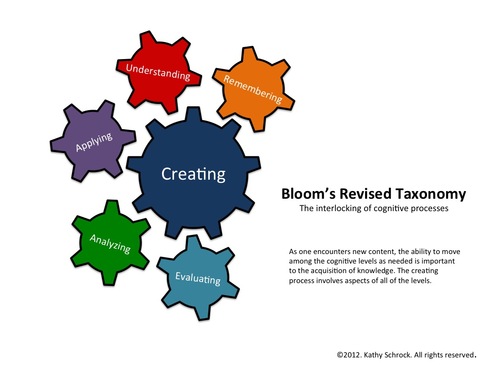
I've written about the interactive app charts that Kathy Schrock has created that organized different iOS, Android, and Google and Web 2.0 apps based on the Bloom's Taxonomy level. They are a great way to find Apps based on what you are trying to have the students do.

She just updated them with a new diagram for Bloom's Taxonomy. The new diagram is interlocking gears instead of a pyramid. It also emphasizes Creating as the biggest thing we should be having students do.

This is a great resource for all teachers looking for some great apps to use with students.


Related:

Bloom's Taxonomy and Technology - great resources for teachers

Android Resources for Education - apps, how-to's, reviews, forums, and more.

Android Apps related to Bloom's Taxonomy

Google for Educators Resources


  • Digg
  • Del.icio.us
  • StumbleUpon
  • Reddit
  • RSS

Brain Trainer app for Android helps you give your brain a workout


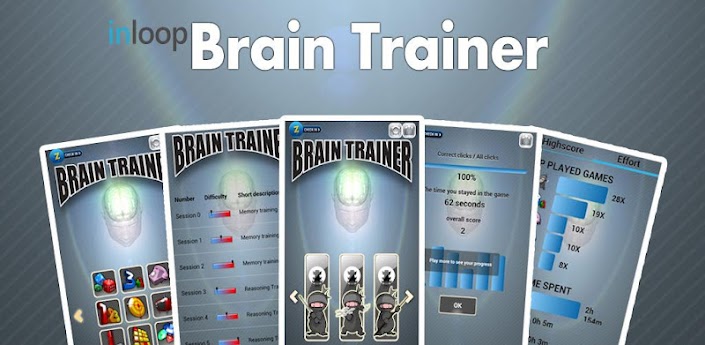
Brain Trainer app for Android is a free (full version for $0.99) app that has games to help you improve your memory and give your brain a workout.

There are games on math, letter and number sequences, picture memory games, shapes, colors, sudoku and puzzles.

This is a great app that can be used for fun or to help improve memory and thinking skills.


Brain Trainer Free

  • Digg
  • Del.icio.us
  • StumbleUpon
  • Reddit
  • RSS

Chalkable - educational apps and classroom management system


Chalkable is a site that lists the best education apps in one place and lets you buy it through the Chalkable site. You can search apps by keyword, or browse by categories like Math, Science, History and more.


It is also a learning platform, providing a calendar, messaging, grade book, and attendance for teachers and students to use.


Teacher and Administrator versions are in Beta and free. The student version is in beta, is $10 per year, and includes $5 towards apps.

It could be a nice way to have classroom management system and apps all in one place.


Related:

EDU 2.0 - free course management system for schools

  • Digg
  • Del.icio.us
  • StumbleUpon
  • Reddit
  • RSS

eduClipper - clip anything, share everything


eduClipper is a new app coming from EduTecher Adam Bellow. eduClipper is in sign up mode now and promises to provide a way to clip anything from the web and then share it with anyone.

Knowing Adam, this will be a great resource for educators and students.

Sign up to be notified when it's ready to go.


Related:

EduTecher - explore and share educational web tools

  • Digg
  • Del.icio.us
  • StumbleUpon
  • Reddit
  • RSS

NearPod - create and share lessons on iPads in classroom - free


NearPod is a free service/app that allows you to create interactive lessons and then share them across iPads in your classroom. Teachers create interactive presentations and then share them with the class.


Here's how it works. The teacher uses the Content Tool to create multimedia presentations and then share the content with the students. The Teacher app allows the teacher to control the activity also. Students receive content and assessments on their device and then can submit answers and responses. The teacher can use the Reporting tool to monitor what the students are doing and collect their responses, assess their learning and gather data.

The multimedia presentations start with a PDF file and then quizzes, polls, videos, activities and more can be added.


It's free, easy to use, and a great resource to use with iPads in the classroom.


Get it from the App Store: http://itunes.com/apps/panarea


  • Digg
  • Del.icio.us
  • StumbleUpon
  • Reddit
  • RSS

5 Different Ways Technology Has Made Learning Easier - guest post


Technology in education has been a hot topic for a while now and understandably so, especially as it continues to grow in importance in our personal, educational, and professional lives. Each facet of technology plays a different part in the way that both teachers teach and students learn. And the best part about it is that you can access a lot of it for free. These five technological breakthroughs have all helped improve education and the ease with which students comprehend lessons:


1. YouTube – Who would have ever thought that YouTube would have a place in the classroom? While it’s made its name off funny home videos and clips from TV shows, it also has allowed teachers to visually show something that they previously were confined to teaching from a text book. With a large number of students being visual learners, this offers the perfect complement to traditional lesson plans.


2. Apps – Apps have revolutionized the way we do things. The common phrase “there’s an app for that” couldn’t ring more true, and goes far beyond the normal GPS or Words with Friends games we’re all familiar with. Apps have far surpassed the confinement of being fun ways to pass the time and have evolved into different ways to help students learn concepts and brush up on educational skills, with apps ranging from helping with grammar/spelling/punctuation mastery to fine-tuning math skills.

CopyBackupFiles Want to backup files? Here are 8 free web applications that can help you


3. Drop Boxes – Internet drop boxes have all but eliminated the “dog ate my homework” excuse because everything can be submitted online. This makes it easier for the student to submit work, and makes it easier for the teacher to keep track of work because it’s all already in one neat place.


4. Individual laptops – A lot of schools are moving over to having individual laptops for each student, which has taken lessons to an entirely new level. It allows teachers and students to interact with lessons individually and as a whole, lets students have each subject’s notes and assignments in one place, and all but eliminates the need for lugging around textbooks to each class and home every night.


5. Social media – You can build fan pages for classrooms, stage Twitter chats for interaction outside of the classroom, and provide web pages that act as a resource guide for ongoing lessons, all through the use of social media. Social media allows us to interact on an entirely different level, and engages students because it’s something they already have an interest in.


Education has done an exceptional job thus far of evolving as technology evolves and grows, and it’s likely that the two will only become further intertwined as technology continues to grow and mature. Finding a way to integrate the two is essential to helping our students continue to learn with ease, and helps further guarantee their educational success.


Author Bio

Melanie Slaugh is enthusiastic about the growing prospects and opportunities of various industries and writing articles on various consumer goods and services as a freelance writer. She writes extensively for internet service providers and also topics related to internet providers in my area for presenting the consumers, the information they need to choose the right Internet package for them. She can be reached at slaugh.slaugh907 @ gmail.com.


  • Digg
  • Del.icio.us
  • StumbleUpon
  • Reddit
  • RSS

Evernote buys Penultimate handwriting app - could mean good things for Education


Handwriting recognition on tablets and other devices is something that I think is vital for many educators and students. It's hard to take notes in a math or science class just using a keyboard due to the symbols and equations. Penultimate is a handwriting app for the iPad that allows users to take handwritten notes and drawings. Evernote just bought Penultimate.

iPad Screenshot 1

I think this is an excellent thing for education. Penultimate was only on the iPad. Evernote is on, well, everything. Evernote said that they will be keeping Penultimate and integrating it into Evernote. I'm hoping that this means that it will be available on all of the platforms that Evernote is available on. I also think that Evernote should make sure it handles the use of a stylus, so that the writing on smaller devices is easier to do and read.

This kind of app, integrated with Evernote, and on all platforms, will be an excellent tool for education.

Source: Evernote Blog: http://blog.evernote.com/2012/05/07/evernote-acquires-penultimate/

Related:

Evernote for Education - resources, tips, how to, lesson ideas, and much more


  • Digg
  • Del.icio.us
  • StumbleUpon
  • Reddit
  • RSS

Apps to Support Bloom's Taxonomy - Android, Google, iPad and Web 2.0


I had seen two great charts Kathy Schrock had made about Apps to Support Bloom's taxonomy. I have seen, and used, the ones for Android and Google. I just found two more on her site: iPad and Web 2.0 Apps.


The charts are interactive and include links to apps organized by the category from Bloom: Creating, Evaluating, Analyzing, Applying, Understanding, and Remembering. The apps I've checked out are all free. Some apps show up in more than one category too.

The iPad and Android charts also have an activity listed under the apps, such as commenting, video creation, etc.


These are great starting points to find apps to use with your students based on Bloom's Taxonomy. Check them out. http://www.schrockguide.net/bloomin-apps.html


Related:

Bloom's Taxonomy and Technology - great resources for teachers

Android Resources for Education - apps, how-to's, reviews, forums, and more.

Android Apps related to Bloom's Taxonomy

Google for Educators Resources


  • Digg
  • Del.icio.us
  • StumbleUpon
  • Reddit
  • RSS