Showing posts with label adobe. Show all posts

Some awesome things happening at Adobe relating to Education


There is a lot going on at Adobe in regards to Education this week.


Creative Suite 6 and Creative Cloud - yesterday Adobe announced the immediate availability of the Adobe Creative Suite 6 Software and the Creative Cloud is expected to be available on Friday, May 11th. Students and Teachers can down the free, 30-day trial (or purchase) on Adobe.com, here: http://www.adobe.com/cfusion/tdrc/index.cfm?product=master_collection.
Here is a link to the release regarding product availability. http://www.adobe.com/aboutadobe/pressroom/pressreleases/201205/050712AdobeCS6Ship.html.


Teacher Appreciation Week & Day 2012

Teacher Appreciation Week - Adobe is running a contest on Adobe Students Facebook page. For the chance to win a $25 iTunes gift card, followers must tag @AdobeStudents and write a wall post about their favorite teacher/mentor and why. Write a story, post a quote, share a video/picture/give a shout out. For the chance to win $50 gift card, they can create something with Photoshop or Illustrator. Enter here: http://www.facebook.com/adobestudents.


More Info:

Adobe Announces Creative Cloud/Suite 6 for Students and Educators
Adobe Launches Creative Cloud - make, share, deliver creative work
Adobe CS6 Release Delivers Major Innovations For Design, Web and Video Pros


  • Digg
  • Del.icio.us
  • StumbleUpon
  • Reddit
  • RSS

Adobe Photoshop Touch Review - very nice app


Adobe Touch Apps family

Adobe recently released a host of Adobe TouchApps - Photoshop Touch, Ideas, Collage, Debut, Kuler, Proto, and Carousel. Design, edit, and elegantly present your work using six new Adobe® Touch Apps designed for your tablet. Whether you use a stylus or just your fingertip, intuitive touchscreen features provide easy, precise control for a variety of creative tasks. Transfer files through Adobe Creative Cloud for refinement in Adobe Creative Suite® software — or to view, access, and share from almost anywhere.

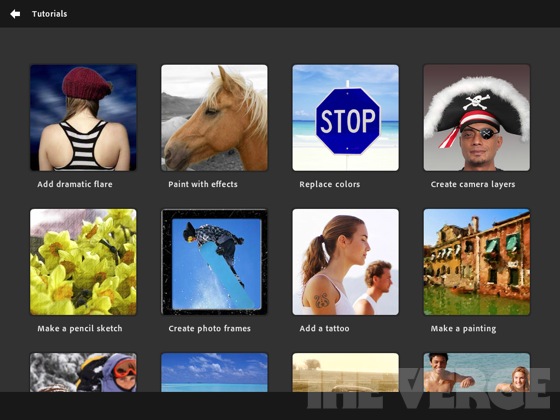
I have been using Adobe Photoshop Touch for the last couple of weeks on a loaned iPad and a friend has it on his Android tablet. The Photoshop Touch app lets you quickly combine images, apply professional effects, share the results with friends and family through social networking sites like Facebook, and more. If you have used Photoshop, the Touch app will be a breeze for you. If you haven't used Photoshop, don't worry, the Touch app is easy to use, has interactive tutorials, and there are tons of help resources on Adobe's site and for educators on the Adobe Education Exchange, which is a resource site for educators who use Adobe products. Tips, instruction guides, videos, a community of users, lesson examples and much more are all available to help teachers and students using Adobe products.


Adobe's new Creative Cloud/Suite 6 for Students and Educators integrates the Photoshop Touch app so that you can work on your projects seamlessly from mobile to desktop. 


The Photoshop Touch app was very easy to learn and get started with. I did use some of the tutorials, and had read a few posts on the education exchange site, but it was very intuitive. Features include layers, effects, filters, tone and edge editing, text, search for images, share images, wireless printing, and much more. The tools are all, literally at your fingertips on the app. Because it's not the full version of Photoshop, it's easier to find the tools that you use the most. It is probably the best image editing app for tablets around and still has all the really important and useful features from the full version of Photoshop. It's easy to bring in an image, edit and manipulate it, and the save it. It's only $9.99, which is super cheap for Photoshop and the Education Volume app store has it for $4.99, which makes it very affordable for education.

Adobe-photoshop-touch-ipad-review-7

I had some fun playing with different pictures I took with the iPad, although the quality of them wasn't great using the iPad's camera, so I also brought in some other pictures and graphics files to play with. It was very easy to clean up images and there is even a gallery of styles and effects that you can look at and then see a step-by-step tutorial on how to achieve those effects.

This is a great app for education. It's inexpensive, easy to use, full featured, and a tool that students should learn to use as it will help them in college and careers.

Here are some screenshots from Adobe's site:
pstouch-1-295x221
pstouch-2-295x221

pstouch-3-295x221

pstouch-5-295x221


Adobe Announces Creative Cloud/Suite 6 for Students and Educators
Link to Photoshop Touch page on Adobe's site: http://www.adobe.com/products/photoshop-touch.html

Original Announcement of app: Adobe PhotoShop Touch for iPad2 now available
Photoshop Touch for iOS. $9.99 


Photoshop Touch for Android. $9.99 


DISCLAIMER: I received a free copy of the Adobe Photoshop Touch app to do this review. I have been using it, and the Adobe Education Exchange, as part of this review.


  • Digg
  • Del.icio.us
  • StumbleUpon
  • Reddit
  • RSS

Adobe Announces $1 Million scholarship for High School Seniors


Adobe Foundation Announces New Million Dollar Creativity Scholarship

Higher Education Scholarships to Focus on Unlocking Creative Potential of Students around the World

This will be a great opportunity for students to get scholarships for college. 

News Release from Adobe:

SAN JOSE, Calif.--(BUSINESS WIRE)--The Adobe Foundation today announced it is committing one million dollars to establish the Adobe Foundation Creativity Scholarships – a new global initiative intended to unlock the creative potential of students. Offered to high-school seniors who participate in the Adobe Youth Voices program, the scholarship will help them continue their education, pursue creative careers and find innovative ways to improve their communities.

“Our vision for this scholarship fund is to support the next generation of creative thinkers and propel the future careers of those who create.”

Students from the Adobe Youth Voices (AYV) network, which includes more than 800 sites in 52 countries, will be eligible to apply for the scholarships. AYV is Adobe’s signature global philanthropy initiative focused on teaching youth from underserved communities the power of creative self-expression and global citizenship. The first scholarship application cycle is expected to begin in spring 2013, with awards distributed for the start of the academic year beginning in fall 2013.

“The urge to create has never been stronger, and the ability to create is unprecedented, yet a new global study shows that most people feel they are not living up to their own creative potential,” said Shantanu Narayen, president and chief executive officer, Adobe (see separate release). “We challenge the notion that creativity is reserved for an elite few, and believe that no matter what you do, everyone has the potential to be creative.”

“With Adobe Foundation Scholarships we are reinforcing our commitment to closing the creativity gap,” Narayen added. “Our vision for this scholarship fund is to support the next generation of creative thinkers and propel the future careers of those who create.”

The Adobe Foundation Creativity Scholarships will be focused on youth who plan to pursue an academic program or career in a creative field at an accredited college, university or certification program. Scholarships will be based on financial need, academic performance and potential. Individual scholarship amounts and lengths will vary based on country, curriculum and other factors.

Additional details about the application process will be announced later this year.


Source: Adobe http://www.adobe.com/aboutadobe/pressroom/pressreleases/201204/042312AdobeFoundationCreativityScholarship.html


  • Digg
  • Del.icio.us
  • StumbleUpon
  • Reddit
  • RSS

Adobe CS6 Release Delivers Major Innovations For Design, Web and Video Pros


Majors CS Upgrades and All-New Muse Anchor Landmark Launch for Designers

The performance and workflow enhancements in Adobe Photoshop CS6, InDesign CS6 and Illustrator CS6 will result in significant time savings for print, web and mobile projects.

More product information is available at: http://www.adobe.com/products/creativesuite.html.

In Photoshop CS6, designers will experience incredible performance, powered by the Adobe Mercury Graphics Engine, enabling near instant results from essential editing tools, including Liquify, Puppet Warp, Transform and Lighting Effects.

Adobe has built on Photoshop’s breakthrough Content-Aware capabilities with advanced new Content-Aware Patch and Content-Aware Move features.

Illustrator CS6 debuts a revamped modern interface and features include a new Image Tracing Engine, Pattern Creation and Gradient Strokes. The Mercury performance system delivers speed and stability, including 64-bit support for Mac OS and Windows.

InDesign CS6 continues to blaze a trail in publishing, streamlining the creation of multiple layouts from a single set of content with new Adaptive Design Tools – Alternate Layout, Liquid Layout, Content Collector Tools and Linked Content.

A brand new application, Adobe Muse™, a radical new tool that enables designers to create and publish HTML5 web sites without writing code.


Adobe Doubles-Down on HTML5 Tooling for Web Professionals

Innovative new workflows and capabilities across Adobe tools simplify the creative process for today’s web designers, developers and interactive professionals.

Web pros can conveniently integrate HTML5 animations, created with Adobe Edge Preview, into their Dreamweaver projects, driving home Adobe’s leadership in tooling for the HTML5 web standard.

Dreamweaver CS6 addresses the challenge of responsive web designs with the ability to build fluid grid layouts replacing the tedious manual process of creating and configuring separate CSS-based interfaces for phone, tablet and desktop.

Through direct integration with Adobe’s recently announced PhoneGap Build service, Dreamweaver CS6 helps round out a Web professional’s skillset and enables them to produce native mobile applications for multiple platforms.

Flash Professional CS6 users can easily translate and transition their skills to HTML5 using the Flash Professional Toolkit for CreateJS. Flash Professional CS6 also helps designers to create exciting and impactful gaming experiences and advancements include the ability to generate sprite sheets that improve workflows and performance.

Pre-built native extensions and new packaging options, leveraging the latest Adobe Flash Player and AIR runtimes, help expand and ease app delivery to Android and iOS devices.


Production Premium CS6 Pushes Boundaries of Video Creativity

Redesigned by and for video editors, with major performance enhancements, the tools included in Adobe Creative Suite 6 Production Premium set a new standard in professional video.

With dozens of new features Adobe Premiere Pro CS6 is the hub of any professional video workflow, featuring a sleek new editing environment. The powerful Adobe Mercury Playback Engine now supports OpenCL on MacBook Pros.

The most significant After Effects release in a decade, After Effects CS6 is faster and more responsive than ever. With Global Performance Cache, previews are saved and ready to go— cutting the time spent bouncing between projects.

New to Production Premium are Adobe® Prelude™ CS6, which streamlines logging and ingest workflows in post-production, and Adobe SpeedGrade, which contains powerful finishing tools for film finishing and color grading.

Adobe Audition CS6 accelerates audio post-production: real-time clip stretching makes it simple to stretch clips to fit and edit; and Automatic Speech Alignment introduces a powerful new engine for automated dialogue analysis.

A new 3rd party API for hardware integration – Adobe Mercury Transmit – allows broadcast video monitoring to connect directly into the Mercury Playback Engine via third-party cards from AJA, Blackmagic Design, and Matrox.


Fast, Feature-Packed Photoshop CS6 and Photoshop CS6 Extended

This major release of the undisputed standard for professional digital imaging integrates over 600 new features and enhancements. The software includes groundbreaking innovations and unparalleled performance breakthroughs that expand the frontiers of imaging science, and deliver new levels of creativity and increased efficiency. Photoshop CS6 Extended integrates the state-of-the-art editing, compositing, and graphic design capabilities of Photoshop CS6, as well as advanced tools for 3D design, image and video editing, and quantitative analysis which address the unique needs of the graphic design, video, Web, architecture, medical, manufacturing and engineering industries.

Since Photoshop CS6 was released as a public beta on March 22nd, 2012 for Mac OS and Microsoft® Windows® platforms, there have been nearly one million downloads of the software worldwide – surpassing any public beta in Adobe’s history.

Create With Imaging Innovation and Peak Performance

Photoshop CS6 and Photoshop CS6 Extended deliver unparalleled speed and power combined with the creative tools necessary to perform advanced image manipulation, design, motion‐based content editing, and compositing. The software helps users to patch images with control for exceptional results; edit with real-time interactions and a fluid feel powered by new GPU acceleration in editing tools; easily edit video; perform automatic tone mapping and sharpening; and use improved design tools for better results with fewer steps. Creatives will be able to take advantage of an efficient, modern UI that puts all focus on images, and sync settings and preferences for consistent workflows across multiple devices via Adobe Creative Cloud.


Photoshop CS6 features include:

Content-Aware Patch – Allows greater control by letting users choose the sample area used to create a patch

Adobe Mercury Graphics Engine – Takes advantage of cross-platform 64-bit support to speed up imaging and editing tasks, and process large images faster

New and Re-engineered Design Tools – Type styles enable consistent formatting; vector layers apply strokes and add gradients to vector objects; custom strokes and dashed lines are easily created; quick layers search and more

Intuitive Video Creation – The full range of familiar Photoshop tools and an intuitive set of new video tools to create and enhance any video clip

Blur Gallery – A simple new interface with on-image controls allows users to quickly create photographic blur effects including tilt-shift effects, blur everything with one focal point, or vary the blurriness between multiple focal points


Photoshop CS6 Extended includes all Photoshop CS6 features and:

Mercury Graphics Engine for 3D – Increased power and speed via engine optimized for 3D imaging

3D Fingertip Controls – UI improvements for more efficient 3D workflows

New 3D Effects – Reflections and “drag-able” shadows to enhance images


More product information is available at: http://www.adobe.com/products/creativesuite.html


  • Digg
  • Del.icio.us
  • StumbleUpon
  • Reddit
  • RSS

Adobe Announces Creative Cloud/Suite 6 for Students and Educators


Adobe Creative Cloud, Creative Suite 6 Deliver Professional Grade Features for Students and Educators


On Monday, April 23rd, Adobe announced Adobe Creative Cloud Student and Teacher Edition, and Creative Suite 6 Student and Teacher Edition for institutions, educators and students worldwide.


In addition to 14 new CS6 point products and four Creative Suites, Adobe is now delivering its first cloud offering for students and educators. Adobe Creative Cloud is a hub where students and educators can explore, share and deliver creative content using any of the Adobe Creative Suite 6 desktop applications, as well as new tools for HTML5 such as Adobe Muse™ and Adobe Edge Preview. By offering integration with Adobe Touch Apps, headlined by Photoshop® Touch, Adobe Creative Cloud enables new mobile workflows, from ideation to publishing, that bring the power of Adobe innovation to the classroom via iPad and Android tablets.


Prepare Students for Careers

With new capabilities designed to help students across all disciplines create stunning digital content that stands out, Adobe Creative Suite 6 gives students the ability to learn the skills needed in today’s competitive workforce:

Gain digital content creation skills across video, animations, 3D and photos with major updates to Adobe Photoshop CS6, Adobe Premiere® Pro CS6, Adobe After Effects ® CS6, and Adobe Audition® CS6. With the new Adobe Photoshop CS6, students can express themselves by leveraging the powerful new 3D and video editing tools for media they have captured across multiple devices.

Create on any device with Adobe Creative Cloud Connection which enables the syncing, sharing and storing of files from Adobe Touch Apps® for download and use with CS6 desktop products. For example, educators and students can work with a file in Photoshop Touch on iPad and use Adobe Creative Cloud Connect to sync and share that file on the desktop for refinement using Photoshop CS6.

Get noticed with multimedia-rich portfolios, websites and applications. InDesign CS6 extends its lead in digital publishing, streamlining the creation of multiple layouts from a single set of content, helping to deliver interactive campus publications for iPad, Kindle Fire and Android devices. Dreamweaver CS6 enables students to create high-impact school or personal websites.


Engage Students, Empower Faculty and Advance Teaching

The new Creative Suite 6 release gives faculty and students the tools to easily visualize, understand, and communicate information in creative ways across print, web, video, and mobile devices.

Create digital education content ranging from digital storytelling for history and languages, and gaming and animations for math, to data visualization in the sciences – all in a way that engages students and creates rich learning experiences. Adobe Creative Suite 6 provides the features and flexibility to produce interactive presentations and explore the boundaries of creativity and critical thinking.

Expand the delivery of education content with multi-screen publishing across multiple platforms and devices using HTML5 and the very latest standards for web, mobile, eBooks, and tablets.

Improve productivity and efficiency in the classroom with simplified workflows, speed and performance enhancements, and a new, more intuitive user interface across the CS6 product set.

Empower educators with ISTE-aligned curricula with the release of three newly-updated year-long, project based curriculums for graphic design and print production, web design and development, and video production. These curricula are available on the Adobe Education Exchange (http://edexchange.adobe.com), along with resources from the education community.

Certify industry-centric technical and communication skills with Adobe certifications. More than 300,000 students worldwide have been certified through the Adobe Certified Associate examination. With CS6, Adobe and CertiPort are offering new, updated curricula and certification for this major release. Educators and students can get certified for both entry-level skills as an Adobe Certified Associate (ACA), and professional-level skills as an Adobe Certified Expert (ACE).


Pricing and Availability

Adobe Creative Suite 6 products and Adobe Creative Cloud are scheduled to be available within 30 days. The Student and Teacher Edition of Adobe Creative Cloud is available for US$29.99/month. Volume licensing for Creative Cloud “team-ready” is available via the Adobe Transactional Licensing Program. More information on Adobe licensing can be found at: http://www.adobe.com/aboutadobe/volumelicensing/education/.

Adobe is also offering a new Adobe K-12 Enterprise Agreement designed for the needs of school districts in the United States and Canada. Customers can purchase Creative Suite 6 via Adobe.com and through select retail and online stores. More product information is available at: http://www.adobe.com/products/creativesuite.html.

For more detailed information about educational upgrade policies and pricing, as well as the full portfolio of suites, please visit http://www.adobe.com/education.edu.html.


Related:

Adobe Digital School Collection - supporting creativity and digital literacy

Adobe Education Exchange - tips, training, help, resources, lesson ideas, community forum and more for using Adobe products in education.


  • Digg
  • Del.icio.us
  • StumbleUpon
  • Reddit
  • RSS

Adobe Launches Creative Cloud - make, share, deliver creative work


Adobe Launches Creative Cloud

Creative Cloud is Adobe's way of bringing their software to the cloud. For a monthly fee, you get access to all of Adobe's products, get the most updated versions, and can access them from home or work. Your files are also available through the cloud.

The subscription fee for this service is cheaper than purchasing licenses for every computer and it will make updates easier on your IT department. The products have been updated with great new features and run faster, you can work on your files in a web browser, and you can work from any device, including an iPad.

The Student and Teacher Edition of Adobe Creative Cloud is available for US$29.99/month. Volume licensing for Creative Cloud “team-ready” is available via the Adobe Transactional Licensing Program. More information on Adobe licensing can be found at: http://www.adobe.com/aboutadobe/volumelicensing/education/.

Adobe is also offering a new Adobe K-12 Enterprise Agreement designed for the needs of school districts in the United States and Canada. Customers can purchase Creative Suite 6 via Adobe.com and through select retail and online stores. More product information is available at: http://www.adobe.com/products/creativesuite.html

One of the nice things with this is that districts will always be able to have the most up to date product, and teachers will be able to access the Creative Cloud from home and school. 

For more detailed informationabout educational upgrade policies and pricing, as well as the full portfolio of suites, please visit http://www.adobe.com/education.edu.html.


Adobe® Creative Cloud, a radical new way of providing tools and services that will change the game for creatives worldwide. A subscription-based offering, Adobe Creative Cloud is a hub for making, sharing, and delivering creative work and it is centered around a powerful release of Adobe Creative Suite 6 software, packed with innovation across its industry-defining design, web, video and digital imaging tools.


Adobe Creative Cloud Highlights

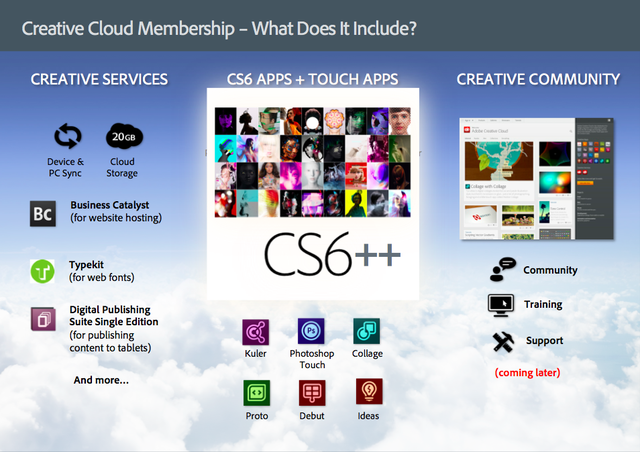
Creative Cloud membership provides users with access to download and install every new Adobe CS6 application announced today and two new HTML5 products, Adobe Muse and Adobe Edge Preview.

Creative Cloud integrates Adobe’s creative tablet applications, such as Photoshop Touch, into everyday work - seamlessly synchronizing and storing files in the cloud, for sharing and access on any device.

Creative Cloud members will be able to easily deliver mobile apps to iOS and Android marketplaces and publish, manage and host web sites.

Adobe Creative Cloud members will have access to application upgrades, including new CS point-product features, before they are launched as part of major CS updates, as well as inventive new products and services as they emerge.


Creative Suite 6, Innovative HTML5 Tools Anchor Creative Cloud

CS6 includes landmark releases of industry icons such as Adobe Photoshop® CS6, Adobe InDesign CS6, Adobe Illustrator® CS6, Adobe Dreamweaver CS6, Adobe Premiere Pro CS6, Adobe After Effects CS6, Adobe Flash Professional CS6 and more. With Creative Cloud membership creatives can download and install all of the 14 new Adobe Creative Suite 6 applications.

Creative Cloud membership also includes access to Adobe Muse® and Adobe Edge® Preview, new tools for HTML5 design and development that demonstrate Adobe’s commitment to the latest web standards.


Creative Cloud Links Adobe Touch Apps to CS6 Desktop Tools

Adobe Creative Cloud integrates Adobe’s line of creative touch tools with CS6 desktop applications.

Adobe Touch Apps bring professional-level creativity to tablet devices and address multiple areas of the creative process: image editing; ideation; sketching; mood board creation; website and mobile app prototyping; and the presentation of finished work.

Photoshop Touch and Adobe Ideas have already proved runaway hits on the iPad and Android tablets. Three additional tools, available on Android today, will be coming to iPad soon: Adobe Collage, Adobe Debut, and Adobe Proto.

A new desktop app, Adobe Creative Cloud Connection, enables the syncing, sharing and storing of files across mobile devices and desktop.

Creative Cloud membership includes up to 20GB of cloud storage, with additional storage purchase options coming soon.

Creative Cloud Publishing Services Streamline Website and App Creation

Creative Cloud publishing services will include the ability to easily publish apps, magazines and catalogues to iPad, iPhone and Android devices.

Members have immediate access to Adobe Typekit, the web-based font library that pioneered the use of real fonts on websites, delivering more than 700 typefaces from leading foundries.

New Web hosting capabilities, integrated as part of Adobe Creative Cloud membership, allow users to easily create and host high-impact web sites. The Integration between Adobe Muse, Typekit and the web hosting capabilities power a new simplified workflow for delivering high-impact web sites.


Members Receive Ongoing Delivery of New Applications, Services and Features

Creative Cloud members will receive ongoing updates to Creative Suite applications as well as other new products and services as they emerge. Coming soon to Adobe Creative Cloud are:

Adobe Photoshop Lightroom 4, the desktop software tool that enables photographic perfection from shoot to finish; the first complete release of Adobe Edge, a ground-breaking HTML5 development tool; and Digital Publishing Suite (Single Edition), the technology behind the delivery of digital magazines on iPad.

Creative Cloud will also include training, support and community features that drive meaningful connections between creatives worldwide.

Learn more about the Adobe Creative Cloud at www.adobe.com/go/creativecloud.


Related:

Adobe Digital School Collection - supporting creativity and digital literacy

Adobe Education Exchange - tips, training, help, resources, lesson ideas, community forum and more for using Adobe products in education.


  • Digg
  • Del.icio.us
  • StumbleUpon
  • Reddit
  • RSS

Adobe Creative Cloud and Creative Suite 6 Launch Webcast - today, 10am PT


Adobe has a big announcement today about Adobe Creative Cloud and Creative Suite 6. The live webcast is today, April 23rd, at 10am PT. There will be information about the new products and some education related announcements.

You can go here for more information about the webcast: http://www.adobe.com/special/cs6/launch-event-desktop.html

I'll be posting information about Adobe's new products after the webcast too.

Save to your Calendar.

Adobe Creative Cloud and Creative Suite 6 Launch


  • Digg
  • Del.icio.us
  • StumbleUpon
  • Reddit
  • RSS

Adobe Hosting an Online Scavenger Hunt with some great prizes Mon April 23rd


Adobe is hosting an online scavenger hunt this coming Monday, April 23rd. Prizes include a lifetime Creative Cloud membership (new product coming - more information to follow).

They are hosting an in-person scavenger hunt in San Francisco: http://createnowquest.eventbrite.com/ It starts are noon Pacific and ends at 6pm Pacific Time.

The online scavenger hunt is from noon to 3pm Pacific Time on Monday (tomorrow). http://createnowquest.eventbrite.com/ Make sure you register first.  For more details read Adobe’s Creative Layer Blog Post.

This is a fun way to use your brain and possibly win some prizes.

Stay tuned for an announcement from Adobe on Monday on some new products too.


Related:

Adobe Digital School Collection - supporting creativity and digital literacy


  • Digg
  • Del.icio.us
  • StumbleUpon
  • Reddit
  • RSS

Adobe Reader mobile adds some great new features


Adobe Reader for mobile has an update with some great new features. The new version for iOS and Android lets you sign PDF documents electronically, as well as annotate, comment, and fill out forms. The interface is also updated. You can electronically sign a document by simply drawing your signature with your finger on a touchscreen.

These updates add features that make it easier to go paperless. Signing forms electronically means no more print, scan, email and with the annotation and commenting features, teachers could have students turn in work in PDF form and then comment on it. PDF files are a great way to share files, so this makes them even more useful. Students can create electronic portfolios using Adobe's Digital Schools Collection (exporting as a PDF file) and then the PDF file can be viewed, annotated, and commented on using the mobile device. I can review and comment on their portfolios anywhere.


When you install the app (or update yours) it will open with a PDF document that will walk you through some of the new features and how to use the app.


I'm very excited to be able to do so much more electronically and with my mobile device.

Source:
Official Adobe Acrobat Blog: http://blogs.adobe.com/acrobat/2012/04/adobe-reader.html
Adobe Reader Mobile Page: http://www.adobe.com/products/reader-mobile.html


Related:

Adobe Acrobat Reader for Android

PDF - interesting infographic and lots of resources for using PDF Files
Android for Education Resources - apps, tips, resources, and more

Adobe Digital School Collection addresses 21st Century Skills for students


  • Digg
  • Del.icio.us
  • StumbleUpon
  • Reddit
  • RSS

Adobe announces Adobe Photoshop CS6 beta free download


Adobe Photoshop CS6 Beta 


Today, Adobe announced Adobe Photoshop CS6 beta, a preview of the highly anticipated upcoming version of the industry-leading digital imaging tool. Please help us spread the news by posting about the availability & encouraging downloads. Additionally, we'd love for you to play around with it & share your thoughts on these new features & enhancements.

The beta includes several new features and enhancements that will be shipped as part of the final release slated for the first half of 2012, including:

· An updated, darker UI that makes images pop
· Increased performance, powered by the new Adobe Mercury Graphics Engine, that accelerates results from popular editing tools including Liquify, Puppet Warp, Transform and Lighting Effects
· Content-Aware Patch, which allows greater control by letting users select and duplicate an area of an image to fill in or “patch” another
· Content-Aware Move, which lets users select and magically move an object to a new place in the image

Over the past couple of months, Adobe's been giving out occasional sneaks of new features coming in Adobe Photoshop CS6 and they've made them available in one convenient place: http://blogs.adobe.com/creativelayer/2012/03/16/photoshop-sneak-peeks/#more

“As an educator, enhancements in Adobe Photoshop CS6 including the Mercury Graphics Engine and new Crop Tool make it possible to save valuable classroom time editing so that we can quickly move on to the next project,” said DanArmstrong, graphic arts teacher, Lake City High School. “With Adobe Photoshop CS6, we have moved from usability to enjoyability and I love it!”

Photoshop CS6 Beta is available immediately as a free download on Adobe Labs for Mac OS and Windows – in English and Japanese. At installation, users will be required to provide an Adobe ID to complete a one-time login and online product activation. Beta users can submit feedback via the Photoshop CS6 beta forum.

The Adobe Press Release can be found here: http://www.adobe.com/aboutadobe/pressroom/pressreleases/201203/032212AdobePhotoshopCS6Beta.html


  • Digg
  • Del.icio.us
  • StumbleUpon
  • Reddit
  • RSS

Adobe PhotoShop Touch for iPad2 now available


Adobe announces the availability of Adobe Photoshop Touch for the iPad2. Photoshop is the premiere, industry standard, for photo editing and effects and having it available for the iPad expands it's usability.

The Android version of Adobe Photoshop Touch, along with other Adobe Touch Apps, was launched on Android back in November 2011.

Photoshop Touch brings core Photoshop tools to mobile devices, and now to the iPad2. Features include: combine multiple photos into layered images, edit and add professional effects, touch up photos, paint, lay out ideas, and more. It also integrates with Facebook and Google Image Search to make finding images easier.

It also has interactive tutorials for users.

This is another great tool for educators and students to use to create projects.

Adobe Photoshop Touch is available in the iTunes App Store for US$9.99. Adobe Photoshop Touch will also be available for $4.99 via the education volume App Store (iTunes Link: http://bit.ly/Ax2Gmj).

If you would like additional information about the app please visit the product page or follow @AdobeEDU or @AdobeStudents for the latest news. Please feel free to contact me directly with any questions.

Here is a link to the press release that Adobe issues – it has some really helpful links: http://eon.businesswire.com/news/eon/20120226005151/en/Adobe/Photoshop/Touch


Related:

Adobe Education Exchange - resources, tips, links, and forums on using Adobe tools in education

Adobe Digital School Collection - supporting creativity and digital literacy

Adobe - wrap up of their recent product releases - great tools for education

Here are some screenshots of Adobe Photoshop Touch:

ios_pstouch_screenshot_01.jpg

ios_pstouch_screenshot_03.jpg

ios_pstouch_screenshot_04.jpg

ios_pstouch_screenshot_06.png


ios_pstouch_screenshot_09.jpg


Check it out!


  • Digg
  • Del.icio.us
  • StumbleUpon
  • Reddit
  • RSS