Showing posts with label Adobe Digital School Collection. Show all posts

Adobe Announces Creative Cloud/Suite 6 for Students and Educators


Adobe Creative Cloud, Creative Suite 6 Deliver Professional Grade Features for Students and Educators


On Monday, April 23rd, Adobe announced Adobe Creative Cloud Student and Teacher Edition, and Creative Suite 6 Student and Teacher Edition for institutions, educators and students worldwide.


In addition to 14 new CS6 point products and four Creative Suites, Adobe is now delivering its first cloud offering for students and educators. Adobe Creative Cloud is a hub where students and educators can explore, share and deliver creative content using any of the Adobe Creative Suite 6 desktop applications, as well as new tools for HTML5 such as Adobe Muse™ and Adobe Edge Preview. By offering integration with Adobe Touch Apps, headlined by Photoshop® Touch, Adobe Creative Cloud enables new mobile workflows, from ideation to publishing, that bring the power of Adobe innovation to the classroom via iPad and Android tablets.


Prepare Students for Careers

With new capabilities designed to help students across all disciplines create stunning digital content that stands out, Adobe Creative Suite 6 gives students the ability to learn the skills needed in today’s competitive workforce:

Gain digital content creation skills across video, animations, 3D and photos with major updates to Adobe Photoshop CS6, Adobe Premiere® Pro CS6, Adobe After Effects ® CS6, and Adobe Audition® CS6. With the new Adobe Photoshop CS6, students can express themselves by leveraging the powerful new 3D and video editing tools for media they have captured across multiple devices.

Create on any device with Adobe Creative Cloud Connection which enables the syncing, sharing and storing of files from Adobe Touch Apps® for download and use with CS6 desktop products. For example, educators and students can work with a file in Photoshop Touch on iPad and use Adobe Creative Cloud Connect to sync and share that file on the desktop for refinement using Photoshop CS6.

Get noticed with multimedia-rich portfolios, websites and applications. InDesign CS6 extends its lead in digital publishing, streamlining the creation of multiple layouts from a single set of content, helping to deliver interactive campus publications for iPad, Kindle Fire and Android devices. Dreamweaver CS6 enables students to create high-impact school or personal websites.


Engage Students, Empower Faculty and Advance Teaching

The new Creative Suite 6 release gives faculty and students the tools to easily visualize, understand, and communicate information in creative ways across print, web, video, and mobile devices.

Create digital education content ranging from digital storytelling for history and languages, and gaming and animations for math, to data visualization in the sciences – all in a way that engages students and creates rich learning experiences. Adobe Creative Suite 6 provides the features and flexibility to produce interactive presentations and explore the boundaries of creativity and critical thinking.

Expand the delivery of education content with multi-screen publishing across multiple platforms and devices using HTML5 and the very latest standards for web, mobile, eBooks, and tablets.

Improve productivity and efficiency in the classroom with simplified workflows, speed and performance enhancements, and a new, more intuitive user interface across the CS6 product set.

Empower educators with ISTE-aligned curricula with the release of three newly-updated year-long, project based curriculums for graphic design and print production, web design and development, and video production. These curricula are available on the Adobe Education Exchange (http://edexchange.adobe.com), along with resources from the education community.

Certify industry-centric technical and communication skills with Adobe certifications. More than 300,000 students worldwide have been certified through the Adobe Certified Associate examination. With CS6, Adobe and CertiPort are offering new, updated curricula and certification for this major release. Educators and students can get certified for both entry-level skills as an Adobe Certified Associate (ACA), and professional-level skills as an Adobe Certified Expert (ACE).


Pricing and Availability

Adobe Creative Suite 6 products and Adobe Creative Cloud are scheduled to be available within 30 days. The Student and Teacher Edition of Adobe Creative Cloud is available for US$29.99/month. Volume licensing for Creative Cloud “team-ready” is available via the Adobe Transactional Licensing Program. More information on Adobe licensing can be found at: http://www.adobe.com/aboutadobe/volumelicensing/education/.

Adobe is also offering a new Adobe K-12 Enterprise Agreement designed for the needs of school districts in the United States and Canada. Customers can purchase Creative Suite 6 via Adobe.com and through select retail and online stores. More product information is available at: http://www.adobe.com/products/creativesuite.html.

For more detailed information about educational upgrade policies and pricing, as well as the full portfolio of suites, please visit http://www.adobe.com/education.edu.html.


Related:

Adobe Digital School Collection - supporting creativity and digital literacy

Adobe Education Exchange - tips, training, help, resources, lesson ideas, community forum and more for using Adobe products in education.


  • Digg
  • Del.icio.us
  • StumbleUpon
  • Reddit
  • RSS

Adobe Launches Creative Cloud - make, share, deliver creative work


Adobe Launches Creative Cloud

Creative Cloud is Adobe's way of bringing their software to the cloud. For a monthly fee, you get access to all of Adobe's products, get the most updated versions, and can access them from home or work. Your files are also available through the cloud.

The subscription fee for this service is cheaper than purchasing licenses for every computer and it will make updates easier on your IT department. The products have been updated with great new features and run faster, you can work on your files in a web browser, and you can work from any device, including an iPad.

The Student and Teacher Edition of Adobe Creative Cloud is available for US$29.99/month. Volume licensing for Creative Cloud “team-ready” is available via the Adobe Transactional Licensing Program. More information on Adobe licensing can be found at: http://www.adobe.com/aboutadobe/volumelicensing/education/.

Adobe is also offering a new Adobe K-12 Enterprise Agreement designed for the needs of school districts in the United States and Canada. Customers can purchase Creative Suite 6 via Adobe.com and through select retail and online stores. More product information is available at: http://www.adobe.com/products/creativesuite.html

One of the nice things with this is that districts will always be able to have the most up to date product, and teachers will be able to access the Creative Cloud from home and school. 

For more detailed informationabout educational upgrade policies and pricing, as well as the full portfolio of suites, please visit http://www.adobe.com/education.edu.html.


Adobe® Creative Cloud, a radical new way of providing tools and services that will change the game for creatives worldwide. A subscription-based offering, Adobe Creative Cloud is a hub for making, sharing, and delivering creative work and it is centered around a powerful release of Adobe Creative Suite 6 software, packed with innovation across its industry-defining design, web, video and digital imaging tools.


Adobe Creative Cloud Highlights

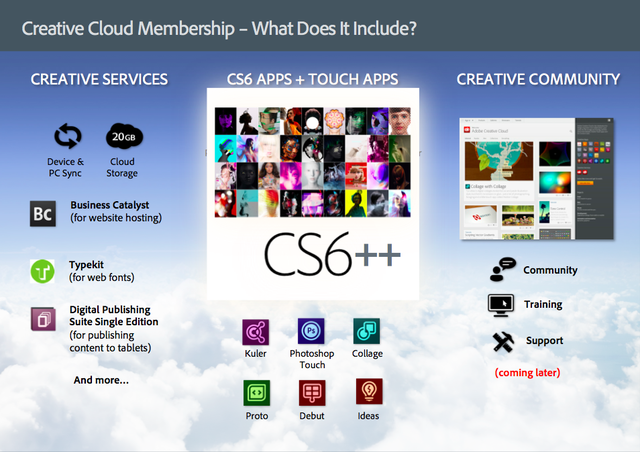
Creative Cloud membership provides users with access to download and install every new Adobe CS6 application announced today and two new HTML5 products, Adobe Muse and Adobe Edge Preview.

Creative Cloud integrates Adobe’s creative tablet applications, such as Photoshop Touch, into everyday work - seamlessly synchronizing and storing files in the cloud, for sharing and access on any device.

Creative Cloud members will be able to easily deliver mobile apps to iOS and Android marketplaces and publish, manage and host web sites.

Adobe Creative Cloud members will have access to application upgrades, including new CS point-product features, before they are launched as part of major CS updates, as well as inventive new products and services as they emerge.


Creative Suite 6, Innovative HTML5 Tools Anchor Creative Cloud

CS6 includes landmark releases of industry icons such as Adobe Photoshop® CS6, Adobe InDesign CS6, Adobe Illustrator® CS6, Adobe Dreamweaver CS6, Adobe Premiere Pro CS6, Adobe After Effects CS6, Adobe Flash Professional CS6 and more. With Creative Cloud membership creatives can download and install all of the 14 new Adobe Creative Suite 6 applications.

Creative Cloud membership also includes access to Adobe Muse® and Adobe Edge® Preview, new tools for HTML5 design and development that demonstrate Adobe’s commitment to the latest web standards.


Creative Cloud Links Adobe Touch Apps to CS6 Desktop Tools

Adobe Creative Cloud integrates Adobe’s line of creative touch tools with CS6 desktop applications.

Adobe Touch Apps bring professional-level creativity to tablet devices and address multiple areas of the creative process: image editing; ideation; sketching; mood board creation; website and mobile app prototyping; and the presentation of finished work.

Photoshop Touch and Adobe Ideas have already proved runaway hits on the iPad and Android tablets. Three additional tools, available on Android today, will be coming to iPad soon: Adobe Collage, Adobe Debut, and Adobe Proto.

A new desktop app, Adobe Creative Cloud Connection, enables the syncing, sharing and storing of files across mobile devices and desktop.

Creative Cloud membership includes up to 20GB of cloud storage, with additional storage purchase options coming soon.

Creative Cloud Publishing Services Streamline Website and App Creation

Creative Cloud publishing services will include the ability to easily publish apps, magazines and catalogues to iPad, iPhone and Android devices.

Members have immediate access to Adobe Typekit, the web-based font library that pioneered the use of real fonts on websites, delivering more than 700 typefaces from leading foundries.

New Web hosting capabilities, integrated as part of Adobe Creative Cloud membership, allow users to easily create and host high-impact web sites. The Integration between Adobe Muse, Typekit and the web hosting capabilities power a new simplified workflow for delivering high-impact web sites.


Members Receive Ongoing Delivery of New Applications, Services and Features

Creative Cloud members will receive ongoing updates to Creative Suite applications as well as other new products and services as they emerge. Coming soon to Adobe Creative Cloud are:

Adobe Photoshop Lightroom 4, the desktop software tool that enables photographic perfection from shoot to finish; the first complete release of Adobe Edge, a ground-breaking HTML5 development tool; and Digital Publishing Suite (Single Edition), the technology behind the delivery of digital magazines on iPad.

Creative Cloud will also include training, support and community features that drive meaningful connections between creatives worldwide.

Learn more about the Adobe Creative Cloud at www.adobe.com/go/creativecloud.


Related:

Adobe Digital School Collection - supporting creativity and digital literacy

Adobe Education Exchange - tips, training, help, resources, lesson ideas, community forum and more for using Adobe products in education.


  • Digg
  • Del.icio.us
  • StumbleUpon
  • Reddit
  • RSS

win a FREE copy of Adobe’s Digital School Collection


The Adobe Digital School Collection (ADSC) is a bundle of software for K-12 students and educators and is available for Windows and Mac OS.

Included in the bundle is Adobe Photoshop Elements 10, Adobe Premiere Elements 10 and Adobe Acrobat X Pro. The “Elements” versions of the software are easier to use than the “Pro” versions. They have less features than the Pro versions but most of the missing features are very advanced and rarely used in the K-12 arena. The new version of Acrobat can include audio and video in a PDF file making PDF Porftolios easy to create. It can also be used to create web sites.

With this software, students can create projects and presentations that combine photos, movies with effects, and multi-media documents. They can also use the ADSC for media rich ePortfolios.

Adobe is also providing resources for educators to help them use the ADSC in their classrooms. The Adobe Education Exchange is a great resource for educators and has curriculum and lesson plans for using the ADSC in class along with teacher resources and a community of users. There are 23 lesson plans, tech guides, user guides, teacher guides, and completed examples to view. There are over 36,000 members in the community and that number continues to grow.

Now, you can enter to win a FREE copy of Adobe’s Digital School Collection in the @AdobeEdu, #ADSC Tweetaway!


Adobe’s Digital School Collection is a key mechanism for augmenting classroom instruction while helping students learn lifelong communication skills for the digital age. Be sure to pay attention to the @AdobeEdu twitter account for your chance to Retweet & win!

Just jump on your Twitter account between Tuesday, April 9th and Thursday, April 19th and tune in for a series of helpful tips & ADSC facts – all you have to do is Retweet posts with the #ADSC hashtag to enter! The winner will be randomly drawn and announced on April 20th.

Learn more about the latest new features such as new photo & video editing tools and easier ways to find objects & share content with others: http://adobe.ly/adSC3 

The contest opens 9 a.m. PT, Tuesday, April 10, 2012, and closes 2 p.m. PT, Thursday, April 19, 2012. The prize drawing will occur on or before 5 p.m., April 20, 2012, with the winner announcement occurring that day as well. The drawings are open to residents in North America only.


  • Digg
  • Del.icio.us
  • StumbleUpon
  • Reddit
  • RSS

PDF - interesting infographic and lots of resources for using them


PDF, Portable Document Format, files are ubiquitous. They are everywhere. They are a great way to share and publish files since they can be locked, watermarked, and viewed on pretty much any device or OS. Most office suites allow you to save files as PDF formats and there are some other great tools for creating them.

Here are some great resources for working with PDF files and an infographic about PDF files and the format.

Lots of PDF resources - print, markup, convert and more

PDFBinder - simple tool to merge PDF documents into one

BabyPDF - Edit PDF documents for free
Crocodoc - markup PDF files for free

Fill Any PDF form - fill out, sign and send forms

I Love PDF - merge or split PDF files

Adobe Digital School Collection - supporting creativity and digital literacy - includes Adobe Acrobat for creating PDF files


  • Digg
  • Del.icio.us
  • StumbleUpon
  • Reddit
  • RSS

Twitterview about Adobe Digital School Collection - Friday Feb 24th - Join us!


Adobe Digital School Collection is a great collection of software for K-12 students and educators and is available for Windows and Mac OS.

Included in the bundle is Adobe Photoshop Elements 10, Adobe Premiere Elements 10 and Adobe Acrobat X Pro. The “Elements” versions of the software are easier to use than the “Pro” versions. They have less features than the Pro versions but most of the missing features are very advanced and rarely used in the K-12 arena. The new version of Acrobat can include audio and video in a PDF file making PDF Porftolios easy to create. It can also be used to create web site.

There is going to be a Twitterview about Adobe Digital School Collection, and you are invited!

The Adobe Digital School Collection Twitterview is next Friday, Feb 24, from 10:00 – 10:30 a.m. PST. Meet product evangelist Johann Zimmern and learn more about the Adobe Digital School Collection. Join in and you’ll be entered for a chance to win a $150 Amazon gift certificate (North America residents only)!

Adobe Digital School Collection empowers students to create projects and classroom presentations that include polished photos, compelling movies, and media-rich documents and ePortfolios, and includes the recently announced Adobe Photoshop Elements 10 and Adobe Premiere Elements 10 software, as well as Adobe Acrobat X Pro.

If you’re not familiar with Twitterview, the process is simple. Join the discussion on Twitter (@AdobeEDU) and include the hashtag #ADSC when you tweet. If you can’t make it on the 24th, please leave your questions or remarks in the comments section of this post or send @AdobeEDU a Twitter message in advance and we’ll make sure Johann answers it.

Don’t forget: North American residents will automatically be entered for a chance to win a $150 Amazon gift certificate when you join in the conversation.

We hope you’ll join!


Learn more about the Adobe Digital School Collection and how you can use it in your classroom in the links below:

Adobe Announces Digital School Collection - great bundle of software for education 

  • Digg
  • Del.icio.us
  • StumbleUpon
  • Reddit
  • RSS