Showing posts with label organization. Show all posts

Zoho Planner being shut down


Zoho Planner- Trademark

Zoho Planner is a service I wrote about this past April that was a very useful way to get organize and plan out your schedule and activities. It allowed you to create to-do lists, notes, upload images and files add email reminders and access your data anywhere.

I just received a notice from Zoho that they are shutting down Zoho Planner. The full notice can be seen below. Planner will remain online until December 31st 2012 but will switch to read only soon. Users will need to back up their data before the end of the year when all data will be erased. Zoho has a support site and email available and reminds users that they can use Zoho Calendar, Wiki and Tasks to replace Zoho planner.

You can also use Google's many services and Evernote to get organized and replace Zoho Planner.

See links to other services and the full shut down notice below.

Related:

Zoho - suite of on-line business, productivity & collaboration apps

Alternatives to Google's web services and apps

Google for Educators Resources

Evernote for Educators Resources

Important Notice Regarding Your Zoho Planner Subscription
First and foremost, we want to thank you for being a Zoho Planner user.
From time to time we need to review our wide portfolio of services, and make sure they are performing to our, and our customers', expectations. As a result of that, we have decided to discontinue our Zoho Planner service.

We realize that as a current user, this change directly affects you today, which is why we wanted to inform you of this decision today before making it public. Though soon the product will be removed from our Zoho.com homage, you will still be able to access your data by logging in directly at planner.zoho.com.

Don't worry, Zoho Planner will remain online from now until December 31st, 2012. However, it will soon switch to a read-only mode. That should give you plenty of time to back up your data, as after that date we will erase everything related to Zoho Planner from our servers. For any product-related questions during this time, you can continue to contact us at support@zohoplanner.com, where we will be happy to help you.
Although Zoho Planner is going again, you should know that most of what you can do with it today, you can accomplish through a combination of other services, like Zoho Calendar, Zoho Wiki and Tasks (part of our Zoho Mail suite). So we certainly plan to keep you in the Zoho family!

We thank you for being our user and we're sorry we can no longer provide this service. At the same time, we're refocusing our efforts on some of our other Zoho applications, and we're very excited about what the future holds for them.
Sincerely,
The Zoho Team


  • Digg
  • Del.icio.us
  • StumbleUpon
  • Reddit
  • RSS

kanban2go - free visual task management and organization


KanBan2Go is a free productivity and organizing app I learned about from Richard Byrne at Free Technology for Teachers. kanban2go is a visual, online task management service. It's simple and easy to use and accessible online from computer, tablet or smartphone (mobile site, not app).


There is a To Do list that is where you put the tasks in the order of priority. The In Progress board is for the tasks that you are actively working on and the Done board is for the completed tasks. This is all done in a visual manner instead of just text and priority codes.


You can collaborate with others on the tasks and sync your tasks with Google Calendar, iCal, Outlook, Evernote and share your boards through email or on Twitter. This is a great resource for teachers, administrators, and students to use to organize themselves and to do collaborative planning on projects.

Here's a video about kanban2go:


Kanban is a Japanese word that means billboard. Companies use Kanban boards to organize, communicate, prioritize and manage what they do. United Technologies uses Kanban's as part of it's ACE (Achieving Competitive Excellence) program and I used it when I worked at Pratt & Whitney and Sikorsky. Using Kanban's allowed us to work more efficiently, be better organized, let everyone know what was going on and where, and keep things working. We also used Kanban cards to create efficient workflows of parts, supplies, and materials throughout the plant.

This method can also be used in education - label things, create boards that communicate better to staff and students, and much more.

You can read more about Kanban here:
http://en.wikipedia.org/wiki/Kanban
Education and Personal Kanban it’s a Win Win Situation

  • Digg
  • Del.icio.us
  • StumbleUpon
  • Reddit
  • RSS

Planboard - lesson planning and organization for educators


Planboard is a new site I just learned about that is an online lesson planning tool for educators. You can import curriculum standards and multimedia content into the lesson plans, making it easy to organize everything. You can share your plans with others and print out PDF copies if needed. It's also very easy to rearrange plans due to missed classes or schedule issues. You can take notes and reminders in Planboard so that they are organized with your lesson and you can reuse your plans from year to year. It is also very easy to edit a lesson plan so it's easy to make updates or changes as you think of them.


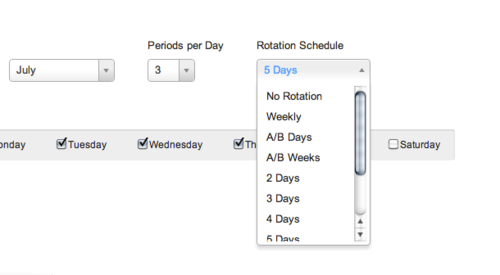
You can also create custom period names and rotating schedules for weekly or daily rotations.


It's not free, however. You can register for a free 30 day trial period to see if you like it. After the trial period ends you can either upgrade to a paid account or just leave. A paid account is $29.95 per year with no limits. There is volume licensing available also.


Disclosure: I did NOT receive any compensation or benefit from this article. 

Related:

Evernote for Education - what I use to organize and plan my lessons 

LearnBoost - free online grade book and lesson planner and more

Using Technology to Organize Your Lessons and Resources


  • Digg
  • Del.icio.us
  • StumbleUpon
  • Reddit
  • RSS

Any.do to-do list app available on Android, & now iPhone and Chrome browser


Any.DO To Do List | Task List

Any.do is a very popular, free to-do list app for Android and it has just been released for iPhone and the Chrome browser. It is simple to use and navigate and you can organize your tasks by date or folder and sort them by dragging and dropping them. It includes gesture based features (similar to webOS) and you can mark tasks as high priority.

The Android and iOS versions are very similar to each other with the Chrome version having less features, but still very useful. It resides on the address bar and opens on top of the current window instead of in a new tap. It can also open into it's own always-open window.


What's nice about Any.do is that your task list is synced across all of the versions, from the Chrome app to the Android and iOS versions so you can access your task list from any device.

This is a great app for students, teachers and administrators to use to keep organized.


Related:

10 Great, Free Apps for Students for Notetaking and Class Planning

Evernote - notetaking, web clipping, and more, on any device

Comparison of some popular note taking apps

Getting Students and Teachers Organized - tips and resources


  • Digg
  • Del.icio.us
  • StumbleUpon
  • Reddit
  • RSS

Successful College Student's Pyramid - tips and ideas


College students, and high school students for that matter, have a lot of things to organize and prioritize. School work, classes, projects, homework, jobs, sports, relationships, parties, fun, sports all take time and effort. Below is an infographic that gives some information and tips and ideas on helping students manage their time, get organized, and prioritize things to be successful.


Successful College Student’s Pyramid
Presented By: Online Colleges


  • Digg
  • Del.icio.us
  • StumbleUpon
  • Reddit
  • RSS

Morganize - free organizational tool for groups


Morganize is a free organizational tool that has features for groups to work together. You can find the best date and time for a meeting, take polls and surveys, and even work with a shared To-Do list.


It's free, no registration is required, and it's easy to use.

Educators can use this to schedule study sessions, meetings, take polls and surveys of students or faculty and work on shared To-Do lists as part of student projects or school projects.

These features exist in other services and systems, but Morganize is simpler and requires no registration or accounts.

Here's an example of the Group Meeting feature:


Related:

Evernote for Education Resources

SpringPad Notetaking and Organizational Tool

Google for Education Resources

Getting Students and Teachers Organized - tips and resources

Taking organizing and planning lessons from Ben Franklin - great tips for educators too


  • Digg
  • Del.icio.us
  • StumbleUpon
  • Reddit
  • RSS

Squidoo - organize your interests online


Squidoo is a free site that allows you to organize things online. You can easily create portfolios of web pages and write about them.

You can also browse other people's collections. Here is the education page: http://www.squidoo.com/topics/education

Education

You can use text, images, and even videos.

It's a great way to organize web pages for research, resources, and even projects.


  • Digg
  • Del.icio.us
  • StumbleUpon
  • Reddit
  • RSS

Slatebox - presentation, mind-mapping, and more


Slatebox is a free tool that you can use to create presentations, mind maps, organize thoughts, and much more. You can create different slates (notes/items) and link and organize them.

There is a free version and it is very easy to use. You can work on slate's collaboratively with others also.

Teachers and students could use this for organizing their thoughts, creating presentations, and mind mapping.

They are working on a version specifically tailored towards education. If you would like to be part of the pilot program, go here: http://slatebox.com/Education

Here's an example of one on energy.


Related:

Popplet - online presentation, mindmapping, and bulletin board
MindMeister - online mind mapping and brain storming

Spicynodes - visualize and organize information and resources

Bubbl.us - online brainstorming for free

Thoughtboxes - organize everything you do - great resource for education
Mindomo - brainstorming and mindmapping software


  • Digg
  • Del.icio.us
  • StumbleUpon
  • Reddit
  • RSS

Business/Manufacturing ideas applied to education


Business and Manufacturing Practices in Education. It's not a new idea, but I'm not talking about treating students like a product. I'm talking about some business and manufacturing processes that can help with other aspects of education. I've written about this before, but covering different ideas.

United Technologies Corporation has a quality program called ACE (Achieving Competitive Excellence)© that I used when I worked at Pratt & Whitney and Sikorsky Aircraft. Every employee is trained on ACE and expected to use it. They have been using it for decades and it does work. ACE is a "set of tools that helps the organization identify process improvement opportunities, solve problems and assist with decision making processes."

There are some great ideas in here that can be used for education. 

6S (sort, straighten, shine, standardize, sustain, safety) and add Spirt (to continuously improve)

This is a method to keep things organized.  A place for everything and everything in it's place. It means that things are labeled and signed and people know where to find things. This could help in education with keeping classrooms, offices, supplies, and paperwork organized, clean and clutter free, along with allowing others to find resources when needed. It is simple - everyday, employees make sure that they are keeping their area clean and organized and that every thing is labeled and put away at the end of the day.

TPM Total Productive Maintenance: safety/lockouts, equipment cleaning/inspection, scheduled walkarounds, preventative maintenance.

Too many times in education we are only fixing things when they break instead of maintaining them. This includes computers, office equipment and facilities. There should be scheduled maintenance of all of these things to prevent issues.

Process Cert/Mgmt: make processes effective, efficient, & agile - while being controllable & standard.
This is a way of evaluating processes and making them work better. This would include how things are done, such as running testing, handling problems, organizing the school day, school schedules, etc. Instead of just having things being done as they always have, this makes people evaluate how and why they do things the way they do and if it is the best way of doing things.

Standard Work: work is simplified & structured for max consistancy, repeatability, and quality
This is a great idea for repeating tasks, such as school startup, state testing, assemblies, office procedures, and more. The tasks are assessed and the best way of doing the task is written down in a procedure. We could use this for the start of school as each year things are missed and have to be done last minute. It's a great way to make sure that things are done the best way, every time.

QCPC: record turnbacks, investigate and eliminate reasons, RRCA: Relentless Root Cause Analysis and Mistake Proofing
I put these three together for education. QCPC is a way to track any problems, issues, errors, and the like so that they can be analyzed and the reason behind them found and fixed. RRCA is a way to look at a problem or mistake and keep digging to find the root cause of a problem. Mistake Proofing is a way of preventing the problem or issue from happening in the future.

An example would be that a student is failing a class. Why? He doesn't complete his work and doesn't come to school enough. Why? He has issues at home. Why? Because he is tired and sick often. Why? Because he works at a job all evening, 5 days a week. Why? Because his family needs the money. How do we fix it? Find a way to help the family so that the student does not have to work that many hours.

Market Feedback Analysis: improve product quality through use of data from customers, in-house.
This is something schools do in a way. They collect data on student performance and attendance. But what about getting actual feedback from the students on what they think about school, how things are going, what they are doing in school, how things could be improved? We should also be getting feedback from parents and the community.

(EH&S) Environment, Health and Safety - mistake proof, risk analysis, environmental impacts, safeguards
EH&S is about having a safe and healthy environment. Keeping things clean and in good repair, and helping to keep staff, faculty and students happy.

Six Sigma is another program, similar to ACE, that is used by many corporations in a similar way and it also has some great ideas that can be applied to education.

I think education can learn a lot from business practices, especially when it comes to quality improvement. All of these things can be used to improve things in schools, without treating anyone like a product.


Related:

Apply Business Practices to Education - great ideas that can help education

5 Tips for Success - in school, business and in life


  • Digg
  • Del.icio.us
  • StumbleUpon
  • Reddit
  • RSS

10 Things To Make Your Day More Productive


1) Wake up early. This will give you more time to get going in the morning and get things done. But make sure you get enough sleep by going to bed a little earlier. 

2) Time things. Many people take too much time doing things, like showering and getting ready in the morning. Set a schedule and stick to it.

3) Plan your clothing the night before. Put whatever you're going to wear to one side of your closet, or folded neatly on a chair.

4) Never run just one errand. Try to always combine at least two to three errands in one trip. Start with the errand furthest away, and then work your way back. There are even smartphone apps to help you plan your trips and even remind you of something you have to do as you get close.

5) Plan your day. Make and use lists. Don't try to remember everything you have to do. Always jot down tasks, errands, things to pick up, etc. Use a smartphone with reminder apps. Use a To-Do list and prioritize things. Check your schedule and to-do list every morning and create a daily priority list. Organize things for the day. At the end of the day, take a few minutes to make sure you are organized for the following day. 
See more tips from Ben Franklin here. 

6) Cook enough for two meals. Put the other half away for a quick meal later. You can also do big cooking or preparation on a weekend and pack it up for the week.

7) Clean and organize as you go. Don't wait until things pile up and you need a full day to do it.

8) Enlist help. Get others to help you out with tasks. 

9) Set aside a specific time and amount of time to return your phone calls, email, social networking etc. That way you don't waste time that should be spent on priorities. Try to eliminate interruptions when ever possible.

10) Reward yourself for a job well done. Take a quick, 15 miin, break in the morning and afternoon to recharge yourself. Make sure you have free time planned into your days or evenings to give yourself time to relax and recharge.


Related:

Taking organizing and planning lessons from Ben Franklin - great tips for educators too

Getting Students and Teachers Organized - tips and resources

Evernote - get organized - free and on all platforms


  • Digg
  • Del.icio.us
  • StumbleUpon
  • Reddit
  • RSS