Showing posts with label whiteboard. Show all posts

Conceptboard - visual collaboration on ideas and documents


Conceptboard Logo

I just found out about Conceptboard, a cool visual collaboration tool, from the company itself. Conceptboard is a cloud-based service that works on PCs, laptops, tablets, and more. It is basically on online whiteboard that allows you to create, review and discuss ideas and concepts and you can even upload a document (PDF, PPT, Doc, images) and share, comment, and work on also. You can also just draw and write on it.

It features real-time, and asynchronous collaboration. You can work with other people in real-time, or people can access the work space at different times and comment and work on the project. There is a moderation mode that allows you to use it as a screen cast and presentation tool and there is also a video conferencing tool.

Here is an example of one with a screen shot of my blog with annotations and highlights on it.


There is a free personal account available, as well as educational accounts for schools. Here are some more examples:


This is a great tool for collaborative work groups, projects, and more. http://www.conceptboard.com/


Related:

Dabbleboard - virtual whiteboard for online collaboration

  • Digg
  • Del.icio.us
  • StumbleUpon
  • Reddit
  • RSS

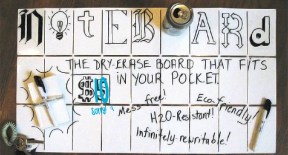
The Noteboard - $10 Foldable Pocket Whiteboard


header

The Noteboard is a $10, foldable pocket whiteboard. It could be great for students and teachers to use in school. Pack it up in your bag and take it with you. Students can use it in class for projects, teachers can use it for different things and pack it away when not needed, and it would be great for conference presenters to take with us to our sessions. It would be great for students to use instead of paper for doing certain practice and projects. They could even use their smartphones to take a picture of their work before erasing and using it as a digital record of their work.

It is dual sided and foldable. Unfolded it is 35" x 5" and folds down to 5" x 3".


For $10, you get the Noteboard, a band to keep it folded, and a black whiteboard marker.


Disclosure: I did NOT receive any compensation for this article. I just think this is a pretty cool thing. 

Source: TechCrunch 


  • Digg
  • Del.icio.us
  • StumbleUpon
  • Reddit
  • RSS

Dabbleboard - virtual whiteboard for online collaboration

Dabbleboard_logo

Dabbleboard is a virtual whiteboard that allows you to create, collaborate and share. It has an excellent interface that is easy to use. You can use it for presentations, homework and study sessions, chat, and as a whiteboard. 

This could be very useful to teachers and students as a way to collaborate and share. There is a free version and then paid plans if you need more functionality. 

Similar to:

Cosketch - online virtual white board you can share with others

Scribblar - online whiteboard

Twiddla - free online team whiteboarding and collaborating


Here is the interface layout:


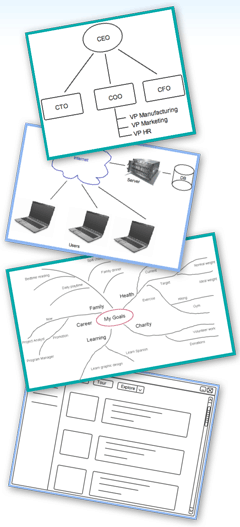
Here are some examples of what can be done with Dabbleboard:

Splash1 Splash2


  • Digg
  • Del.icio.us
  • StumbleUpon
  • Reddit
  • RSS